

Announcing the Solo MCP connector - Connect Solo with your AI Agent
Written by:
Solo now has an MCP connector. MCP (Model Context Protocol) is the open standard AI agents use to work with outside software, so once it's connected, Claude, ChatGPT or Microsoft Copilot can read your Solo projects and, with your sign-off on each change, write back to them. You ask in plain language; the assistant finds the wells, pulls the data and puts the result where your team already works. All you need to get started is to contact your Account Executive to assign you a license to the connector.
What the Agent Can Reach
Your Solo projects
The assistant sees anything in a project your Solo role can open, including the regulatory well data that you have brought in from Solo Data Factory (SDF). Permissions don't change: if you can't open a project in Solo, the assistant can't either.
In your Solo projects
- Wells and typewells, with metadata, and trajectories it can read, extend or replace
- Logs, image logs and mudlogs
- Tops, topsets and zones; target lines and interpretations; horizons, earth models and grids
- DrillSpot traces: rate of penetration (ROP), weight on bit (WOB), standpipe pressure (SPP), hookload, plus Rig Activity and drilling KPIs
- Slide sheets and anti-collision
- Completions and production curves per well; well attributes, polygons and sticks
One Hub for All Your Data
Bring data in from anywhere, see it in Solo
An assistant can hold several connectors at once. It reads from your other systems and writes the result into Solo, in one conversation.
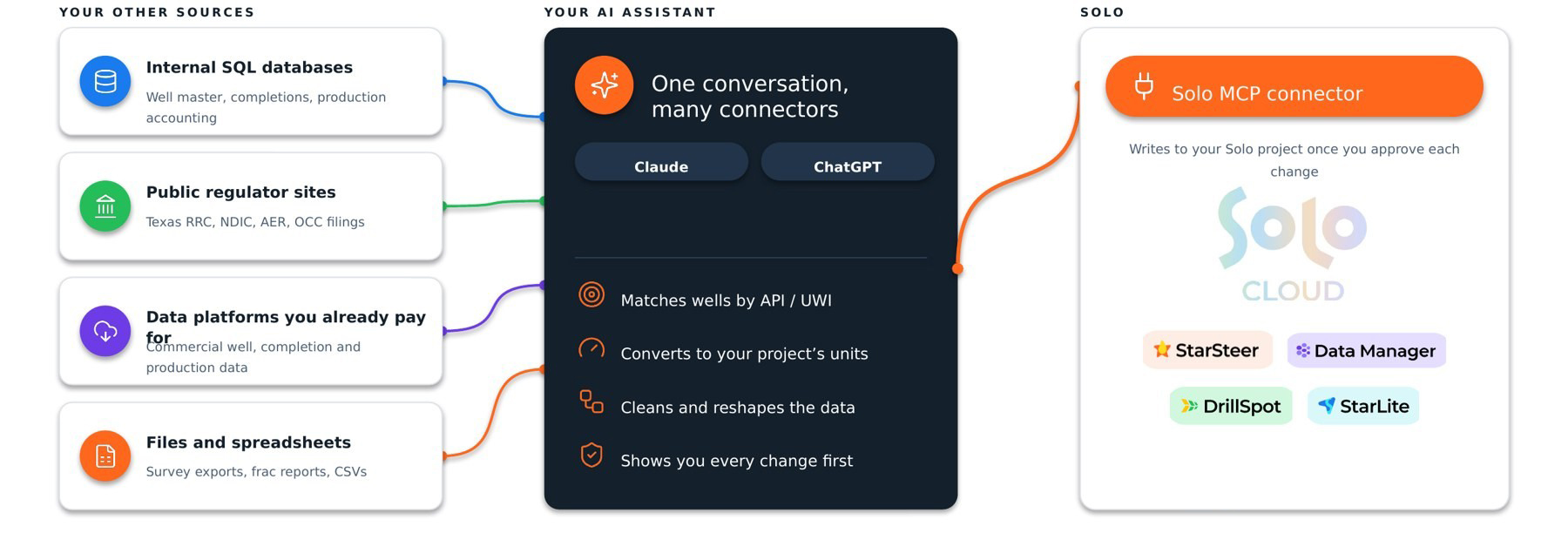
Your other sources can include internal SQL databases (well master, completions, production accounting), regulatory sites (Texas RRC, NDIC, AER and OCC filings), commercial well, completion and production data from platforms you already pay for, and files and spreadsheets such as survey exports, frac reports and CSVs.
Your AI assistant, whether that's Claude or ChatGPT, matches wells by API/UWI, converts values to your project's units, cleans and reshapes the data, and shows you every change first.
Solo receives the writes through the Solo MCP connector once you approve each change. From there it's the same project StarSteer, Data Manager, DrillSpot and StarLite work from.
Why Solo is the Single Source
Two steps: load it into Solo, then analyze it with the MCP
Load each report once, with the PDF on the well. After that, every question reads the structured data and the documents together.
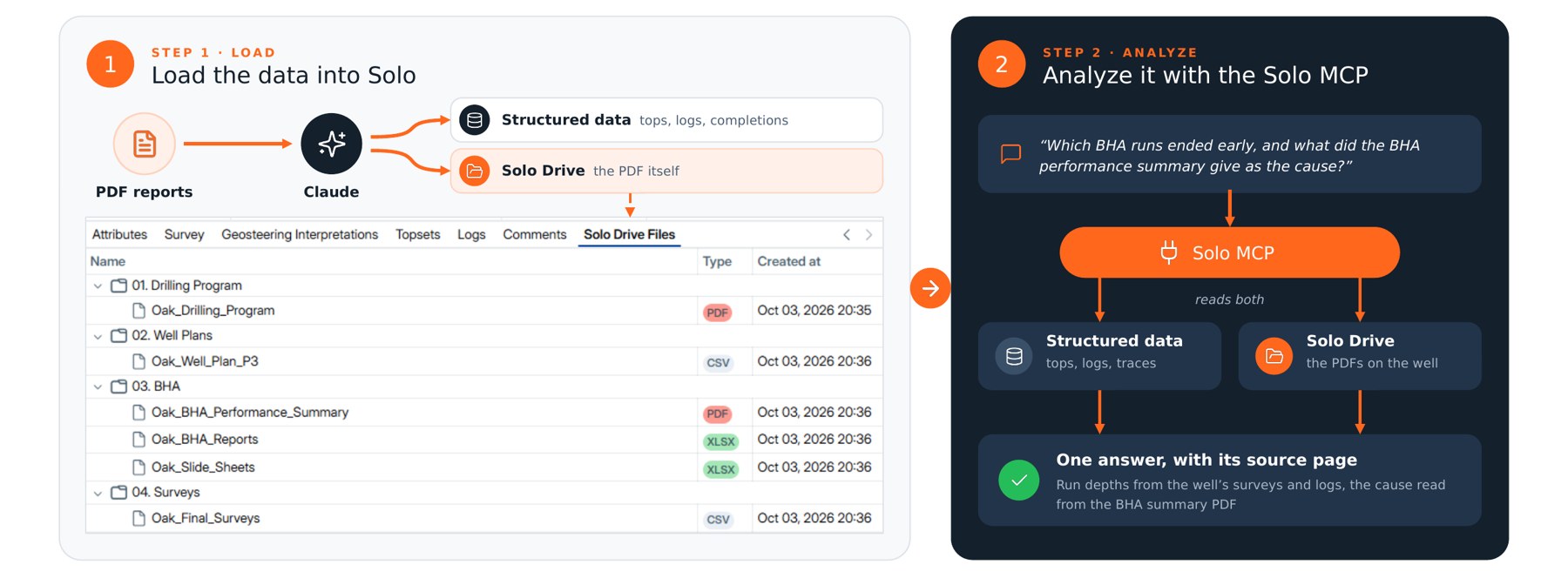
Step 1 · Load. Get the data into Solo: structured data such as tops, logs, traces and completions, and the PDF reports themselves in Solo Drive, filed on the well.
Step 2 · Analyze. Ask through the Solo MCP connector, which reads both. Take a question like "Which bottomhole assembly (BHA) runs ended early, and what did the BHA performance summary give as the cause?" The assistant takes the run depths from the well's surveys and logs, reads the cause from the BHA summary PDF, and returns one answer with its source page.
Use Case 1- Well Planning from RRC Plats
Automatic stick planning from RRC plats
"Eight permits just posted for a pad next to ours. Can we see them in StarSteer today?"
In: 8 Texas RRC W-1 plats (PDF) · Out: 8 sticks in StarSteer, depths set by bench
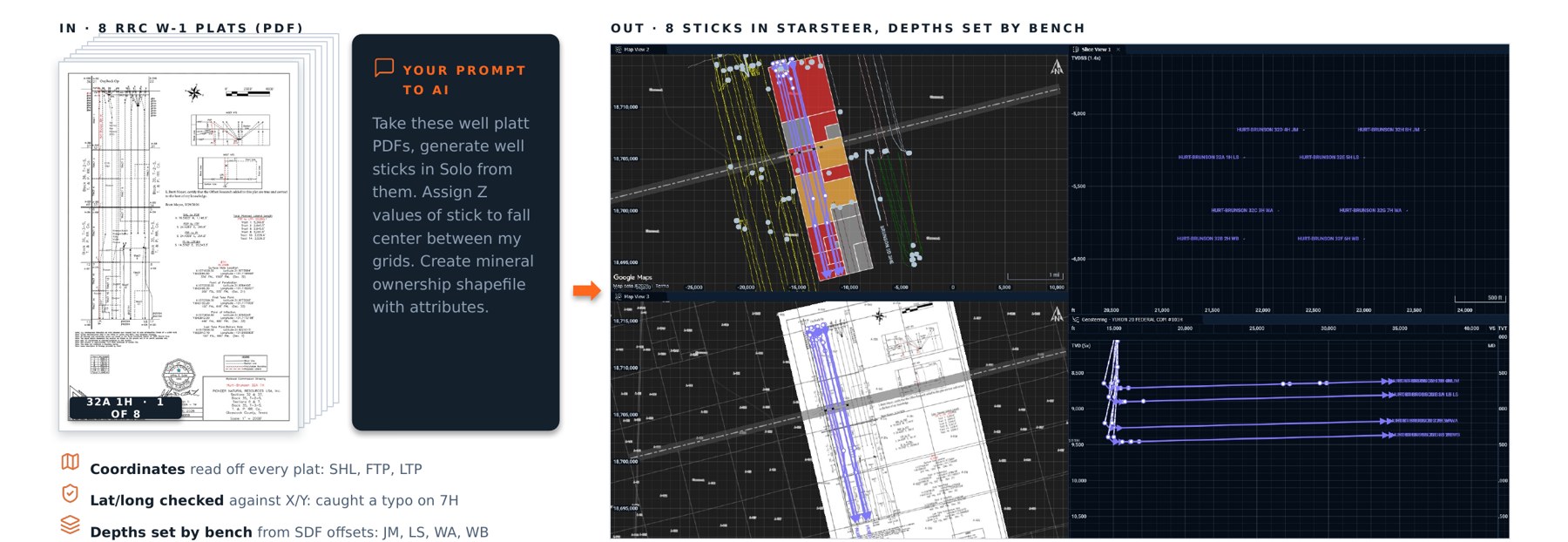
Your prompt to AI: Take these well plat PDFs, generate well sticks in Solo from them. Assign Z values of stick to fall center between my grids. Create mineral ownership shapefile with attributes.
- Coordinates read off every plat: surface hole location (SHL), first take point (FTP) and last take point (LTP)
- Lat/long checked against X/Y, which caught a typo on the 7H
- Depths set by bench from SDF offset wells: JM, LS, WA, WB
Use Case 2 - Drilling Events from Daily Reports
280 lost hours, found in the daily drilling reports
"Where did this pad lose time, and does it happen at the same depth or formation on every well?"
In: daily drilling reports (PDF) · What it found: 52 events · Out: every event at its depth, in Solo 3D
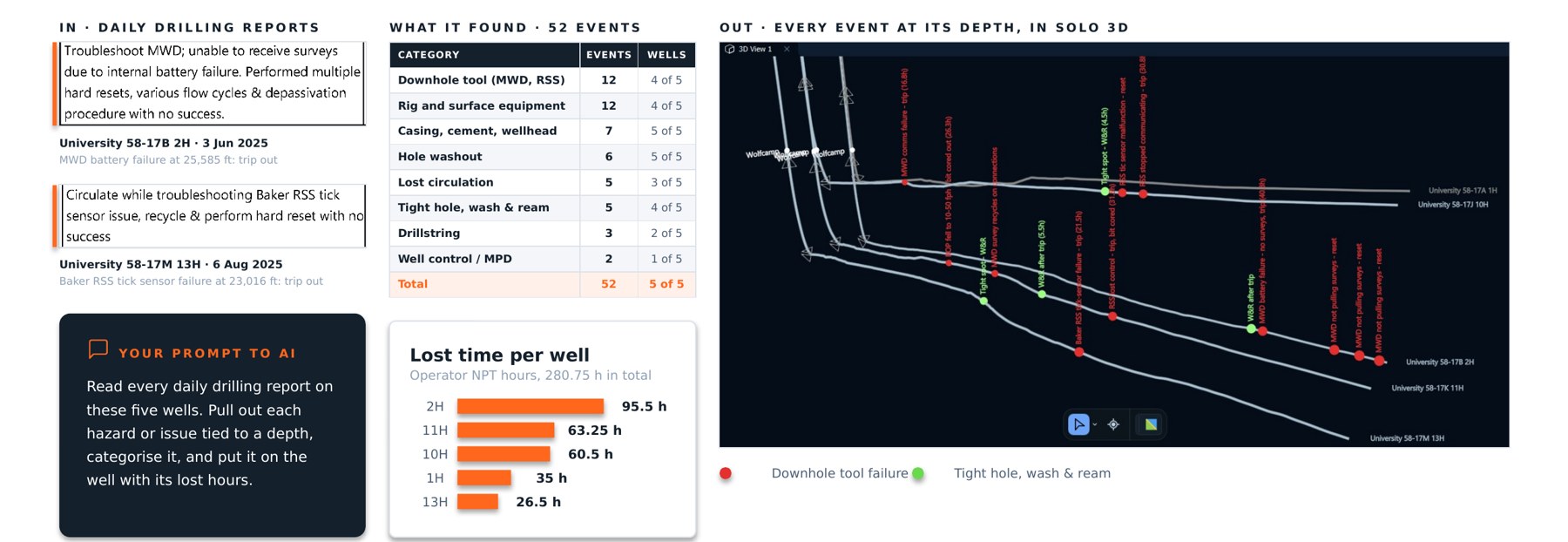
Your prompt to AI: Read every daily drilling report on these five wells. Pull out each hazard or issue tied to a depth, categorise it, and put it on the well with its lost hours.
Lost time per well: 280.75 hours of operator-reported non-productive time (NPT) in total, from 95.5 h on the 2H, 63.25 h on the 11H and 60.5 h on the 10H down to 35 h on the 1H and 26.5 h on the 13H.
Each event stays tied to its report. On University 58-17B 2H, an MWD battery failure at 25,585 ft forced a trip out on 3 June 2025; on University 58-17M 13H, a rotary steerable (RSS) sensor failure at 23,016 ft did the same on 6 August 2025.
Use Case 3 - Project Data QC
Find the gaps, then file them for QC
"Which wells aren't ready to steer on? Put them somewhere we'll fix them."
In: a project of 140 wells and 12 typewells · Out: one folder per check in StarSteer, failing wells moved in
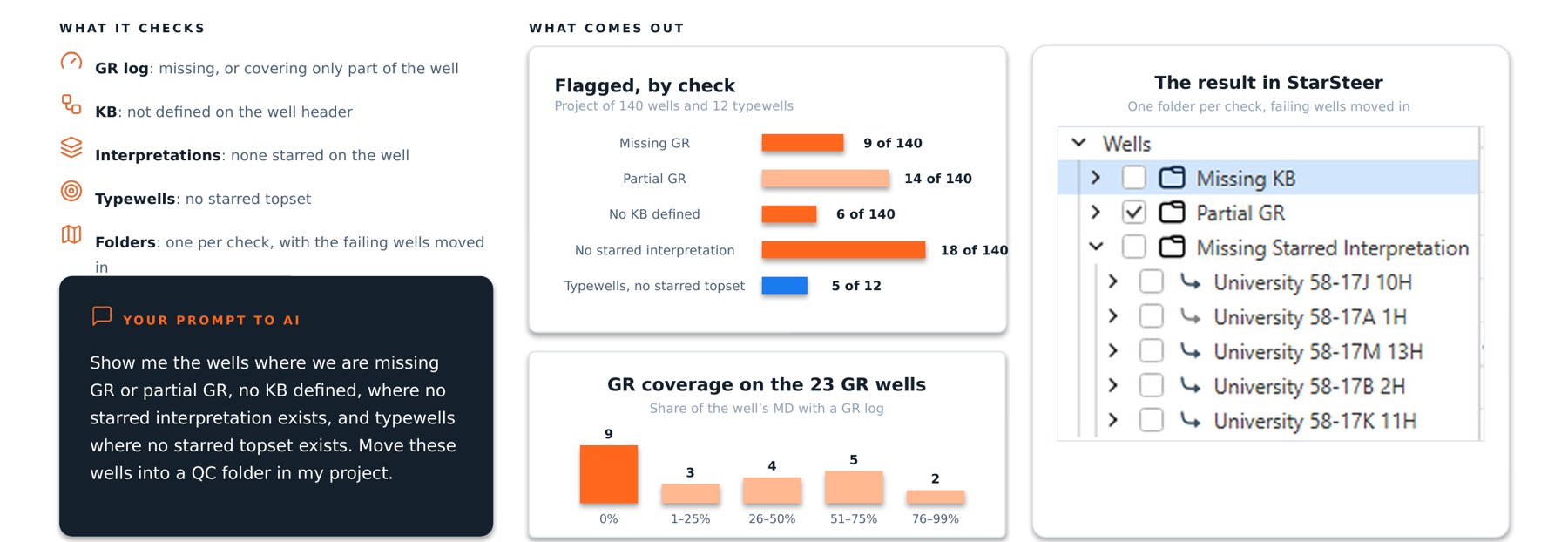
Your prompt to AI: Show me the wells where we are missing GR or partial GR, no KB defined, where no starred interpretation exists, and typewells where no starred topset exists. Move these wells into a QC folder in my project.
What it checks: a gamma ray (GR) log that's missing or covers only part of the well, KB not defined on the well header, no starred interpretation on the well, and typewells with no starred topset.
In StarSteer, each check gets its own folder with the failing wells already inside, so the cleanup list is the project itself.
Use Case 4 - End-of-pad Report
Six laterals, 57,876 ft of lateral, 77% in zone
"The pad is done. Give me one page on how every lateral was drilled, landed and steered."
The assistant pulled depths, directional data, geosteering results and completions for all six laterals into one page: 77% in zone across the pad, 23 zone exits and 197 stages.

Where every lateral sat, heel to toe shows each well's position against its target bench along the lateral. Gun barrel and well spacing looks toe-ward, with average diagonal spacing of 433 to 579 ft over the shared lateral. The full report also carries KOP, curve and lateral DLS, tortuosity and stage spacing for every well.
Solo API - Object Types
The connector reaches 31 Solo object types. It can read all of them except images, and it can write to 19:
The other 12 are read-only: tops (with zones), horizons, earth models, drilling and time-based traces, slide sheet intervals, anti-collision settings and uncertainty ellipses, log families, reference and well lists, tool codes, and object update history showing who changed what, and when.
Nothing is ever deleted. The connector refuses deletes by design, and every update or replace shows you its impact and waits for your approval before it touches the project.
Connect Solo to your AI Assistant today
Solo MCP Connector
All you need is to request us to activate the connector with Solo Licenses. Contact as at support@rogii.com or reach out to your Account Executive today.
Then, connect your AI Assistant to Solo Cloud Connector, and you're on your way to plain language querying and data analysis!


