

How Solo Cloud + TLog Give Operations Geologists Real-Time Mudlogging Visibility
If you’re an Operations Geologist in the office with Mudloggers on site, you probably live in the reality of receiving a mudlog report twice a day, and by the time you spot something important the bit is already far past an interval where a critical decision was needed.
Solo Cloud integrated with TLog is designed to remove that delay.
Instead of waiting on emailed files, you work off a live, cloud-hosted well where mudlogging, geosteering, and drilling data are all connected. You and your mudloggers see the same data, in real-time.
What Is TLog, and Who Is It For?
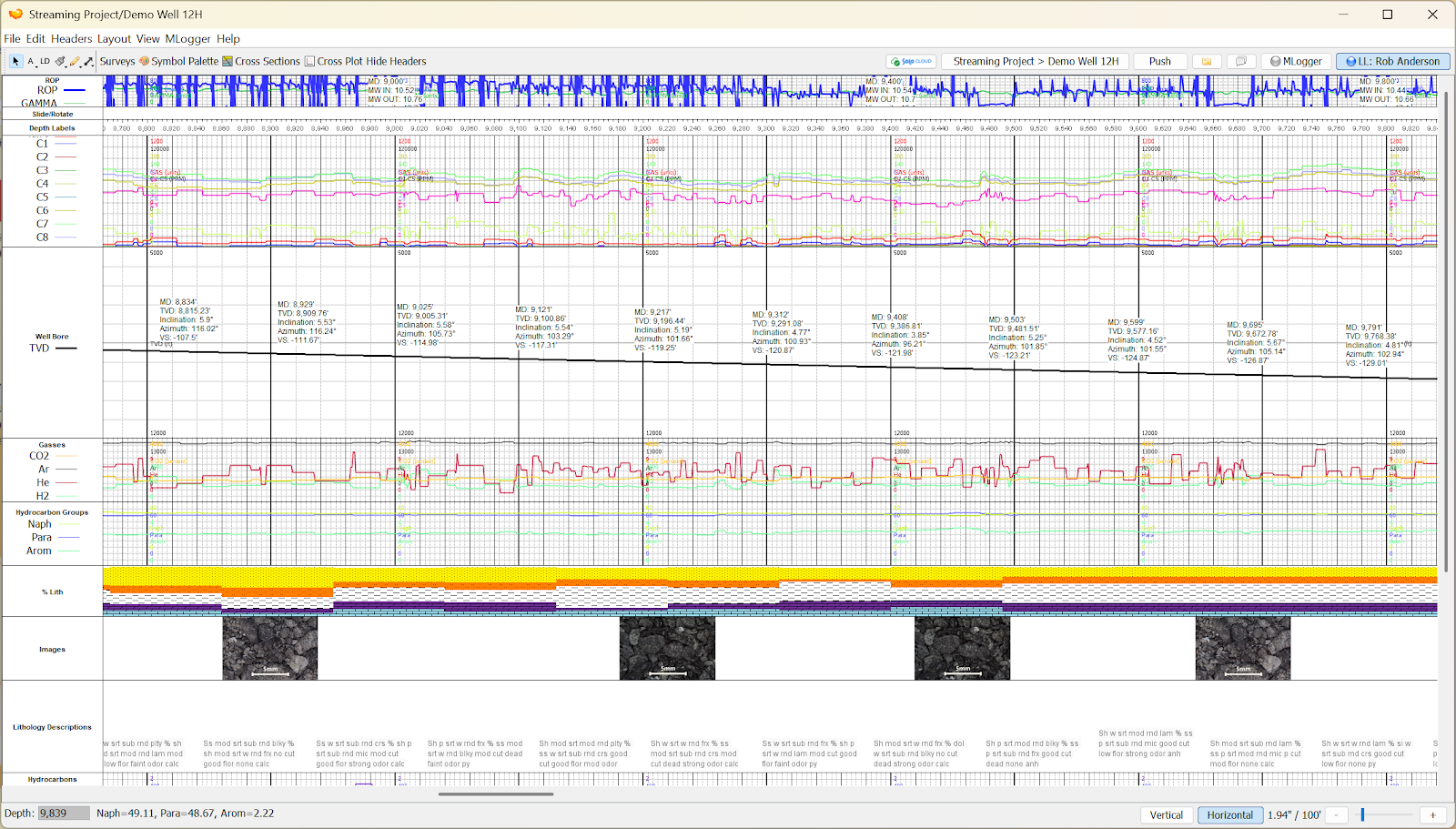
TLog is ROGII’s graphical mudlogging application for Geologists and Mudloggers. It’s built to generate professional-grade vertical and horizontal mudlogs and striplogs in digital formats.
In practice, mudloggers use TLog to:
- Build and customize mudlog and striplog templates
- Import drilling and geological data (LAS, TXT, CSV, images)
- Display curves (e.g., gas, ROP, XRF/XRD), lithology, histograms, and images in flexible tracks
- Export finished mudlogs to PDF, TIFF, or PNG
- Export lithology descriptions to TXT for geology reports
There are two versions:
- Standard licensed edition – full edit and creation
- Viewer (read-only) – view and print only, commonly sent to operators
If you are already a Solo User, you can download and install TLog for free here:
https://kb.solo.cloud/TLog+Installation
What Is Solo Cloud?
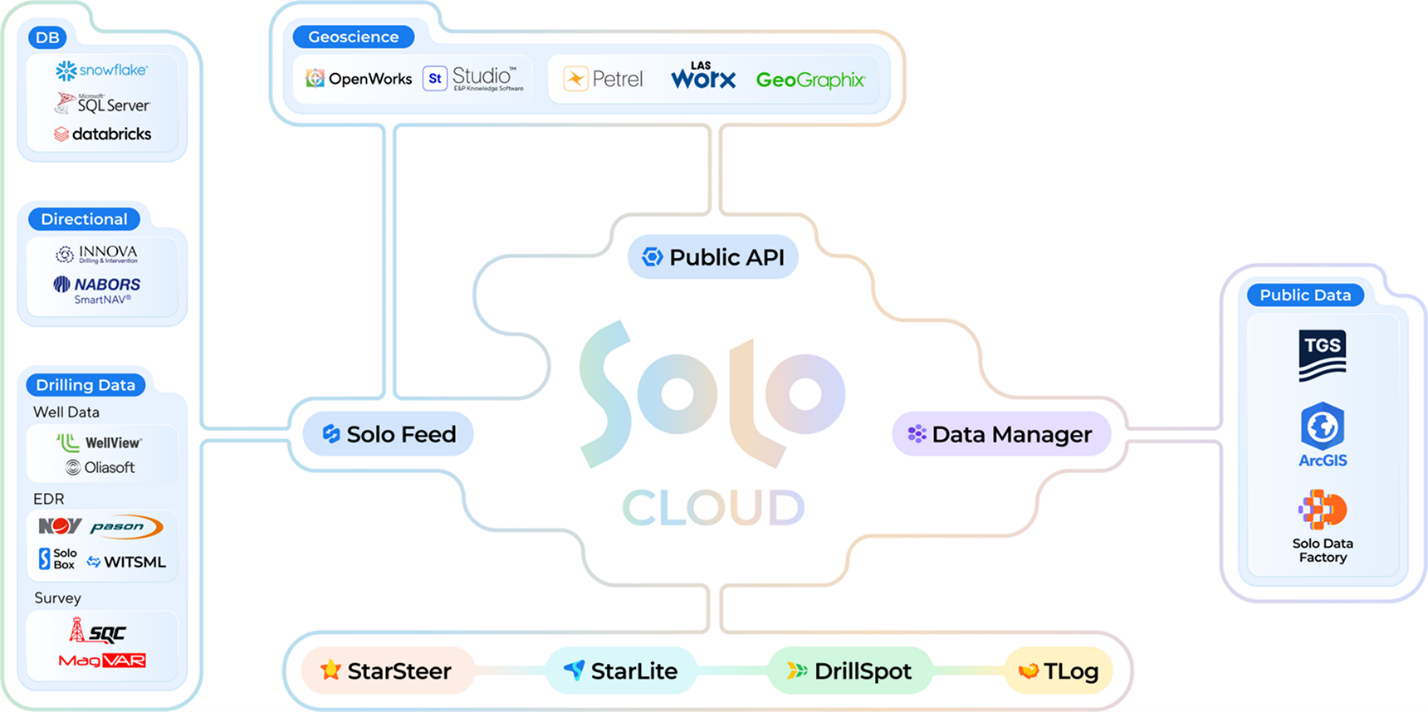
Solo Cloud is ROGII’s cloud-based field development platform. Think of it as a central hub for StarSteer, DrillSpot, StarLite, TLog, and Data Manager.
Instead of each application owning its own project files, the well itself lives in Solo.
Solo Cloud connects multiple ROGII products:
- TLog – mudlogging and striplogs
- StarSteer – geosteering & well placement
- DrillSpot – real-time drilling monitoring and analytics
- StarLite – web/mobile viewer for wells and interpretations
- Data Manager (DTM) – cloud data management and regional data sets
Key capabilities:
- Multi-user read/write from anywhere (office, home, field)
- Secure, SOC 2 Type II cloud storage of wells and projects
- Real-time access for different disciplines working on the same wells
Why Solo Cloud + TLog Matters to Your Team
1. Live Mudlog Visibility, No Delayed Reports
Solo Cloud is your ticket to full, real-time visibility of subsurface operations.
❌ Without Solo:
- Mudloggers update TLog at the rig
- At set times or by request, they export PDFs or project files then email or drop on a shared drive
- You react hours later, often after the bit is past a critical interval
✅ With Solo in the loop:
- Mudloggers still work in TLog on location, no change to their core workflow
- Mudlog data is pushed to Solo Cloud
- You see all updates to the mudlog on your own TLog application, as they happen
- You see traces and other mudlog information in real-time on Solo-connected tools (StarSteer, StarLite, DrillSpot)
For you, this means:
- You can spot gas trends, shows, and lithology changes while they’re being logged
- You don’t have to chase mudloggers for the “latest file”
- Conversations become proactive:
- “I’m looking at your current mudlog, can you inform me on what happened to the gas data at 7,750–7,820 MD?”
2. Simple Data Flow: TLog → Solo Cloud → StarSteer, DrillSpot, StarLite
With TLog connected to Solo Cloud, it becomes part of a unified data flow:
- Mudlogger updates mudlogs in TLog at the rig.
- Data is brought into TLog using standard imports and live logging workflows.
- Mudlog data is pushed to Solo Cloud.
- From Solo, the same mudlog data is available to:
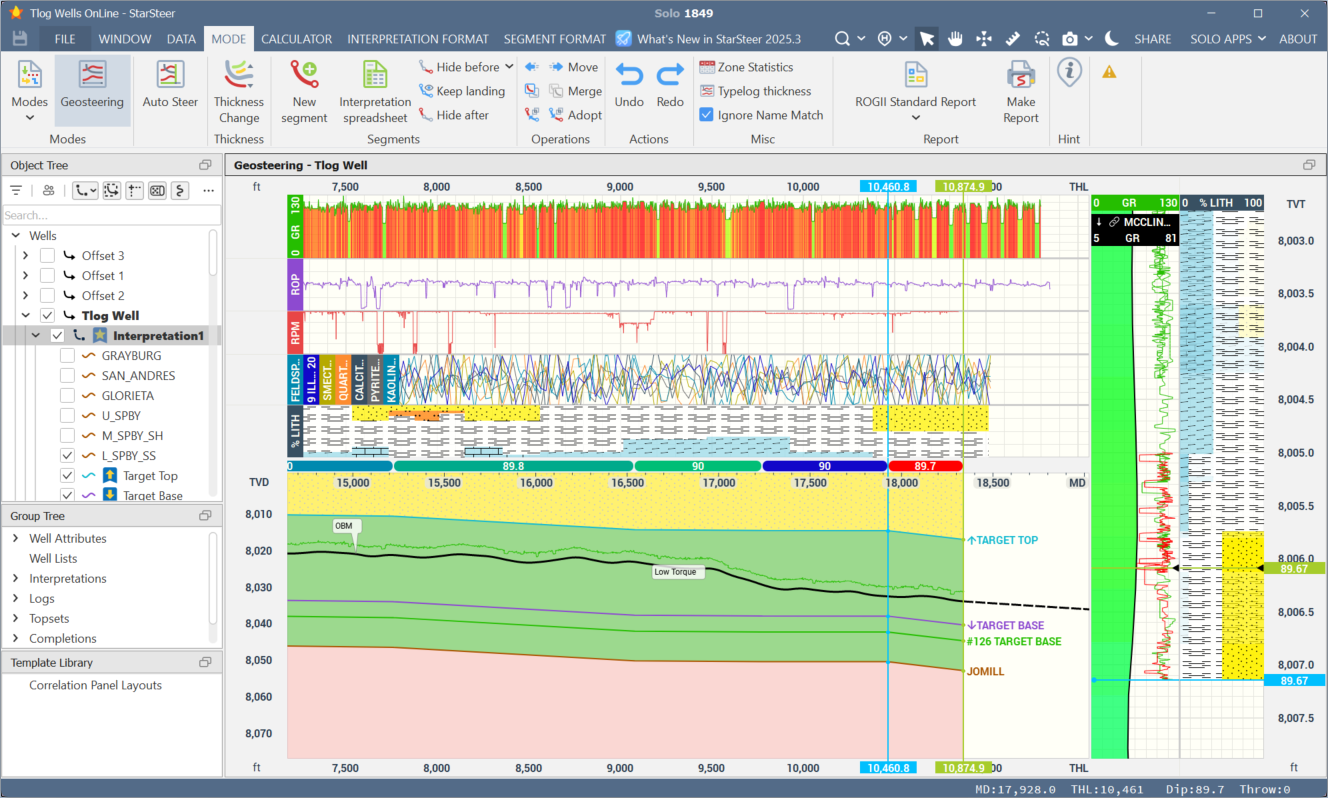
- StarSteer (for geosteering and well placement)
- DrillSpot (for drilling & performance analytics)
- StarLite (for managers and remote viewers)
3. Real-Time QC Instead of End-of-Well Post-Mortems
When TLog is part of the Solo ecosystem, QC workflows shift from “after TD” to “while drilling”:
You can:
- QC lithology descriptions as they arrive
- Check consistency against offset wells and pre-drill models
- Ask the mudlogger for more detailed descriptions or pictures where needed
- Validate depth alignment against LWD and drilling data
- Confirm that mudlog curves line up with gamma/resistivity and drilling channels
- Catch depth shift issues proactively
- Flag key intervals in context
- Mark potential reservoir tops, contact zones, or problematic facies in the same environment your geosteering team uses
- Incorporate XRF/XRD and Mass Spec Data
- Identify potential well bore stability issues or low ROP zones
Result: fewer misaligned logs, fewer surprises, and a much tighter feedback loop between office and field.
4. One Place to See All Your Active Wells
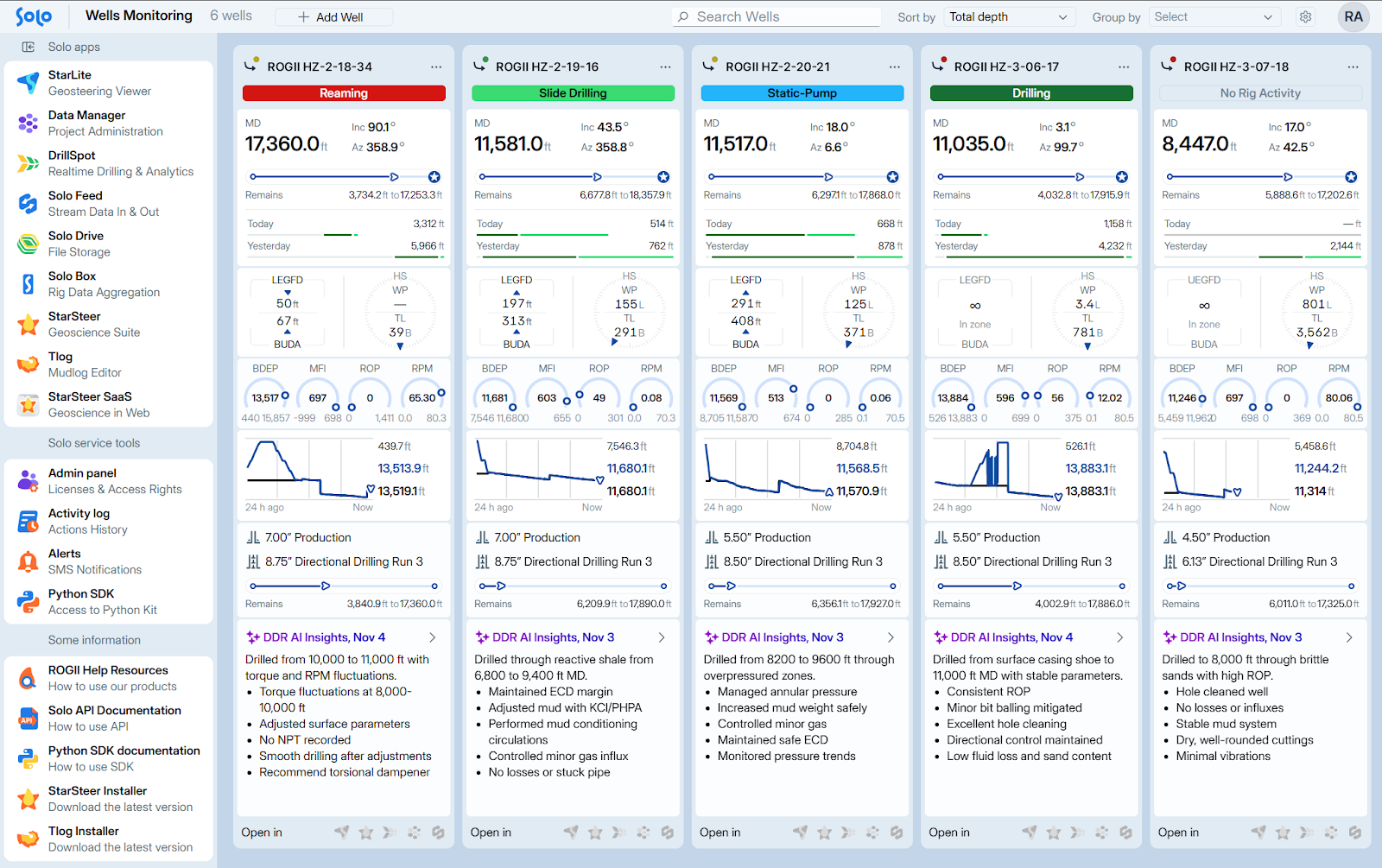
For many operators, responsibilities can extend beyond one well. Watching several wells at once is simple with Solo Cloud, since all data is connected and compartmentalized at the well level.
Solo Cloud gives you:
- A centralized list of active wells you have access to
- Consistent naming, metadata, and status across the program
- Ability to open TLog with one click from the Solo Cloud landing page
- Easily open a specific well in TLog from the BOSS Dashboard Well cards
- Web/mobile access via StarLite, so you can “check in” from anywhere without firing up heavy desktop software
This is especially valuable when you’re:
- Overseeing multiple rigs and service companies
- On call for overnight operations but not physically on site
- Supporting geosteerers or junior staff who may miss signals in the noise
Coming Soon: Solo Cloud → TLog (Closing the Loop)
Currently, TLog sends mudlog data to Solo. Upcoming Solo-to-TLog integration will let mudloggers consume standardized data from Solo Feed directly in TLog.
Right now, Solo aggregates data from multiple sources for drilling and geosteering operations. The roadmap for TLog integration includes flow in the other direction:
- Data parsed via Solo Feed (e.g., WITSML trajectories, drilling channels, logs)
- Stored centrally in Solo Cloud
- Automatically available in TLog on location
What that will mean for you and your teams:
- Rig-site TLog sessions will use the same trajectories, depth references, and logs that Solo already holds
- Geologists and Mudloggers have the same consistent data source and see the same view of the well
- Less manual import work for mudloggers
The Takeaway for Operations Geologists and Managers
TLog connected to Solo Cloud turns mudlogging from a delayed, file-based process into a live, integrated part of your cloud well:
- See what your mudloggers are updating, in real time
- QC lithology, depth alignment, and shows in context with LWD and drilling data
- Watch multiple active wells from a single, cloud-hosted view
- Keep mudlogs, geosteering, and drilling analytics aligned around one version of the well
- Manage TLog access and licenses centrally as your program scales
- Prepare for full two-way integration (Solo ↔ TLog) that simplifies both field and office workflows
For operations teams, this means more time ahead of the bit and fewer surprises in the post-well report. For managers, it’s a cleaner, more controlled way to connect rig-site mudlogging to the decision makers in the office.
Connect to Solo Cloud Today
Ready to enhance your mudlogging project workflows with Solo Cloud? Talk to your Account Executive or contact ROGII Support for the next steps on Solo Cloud and TLog licensing.
We will set up your organization in no time, so you can start collaborating in real-time.
If you are already a Solo User, you can download and install TLog for free here:
https://kb.solo.cloud/TLog+Installation
Please reach out to our team for help with installing TLog then assigning licenses to your users. The process is easy to follow and we are happy to help you get started!


